Tomatis Testing - Student struggle
TomatisTesting — My First Paid Project: Building an Audiometry Tool in Java Swing
A look back at the summer of 2016, when a young student, a software developer wannabe named Maksym built a medical-grade hearing test application with nothing but Java, determination, and a lot of hardcoded pixel coordinates.
The Summer That Started Everything
Every developer remembers their first paid project. Not the tutorial side-projects, not the homework assignments — the first time someone handed you a real problem and trusted you enough to pay for the solution.
For me, that project was creating a digital version of analog equipment for hearing testing: a desktop audiometry application built in Java Swing during the blazing summer of 2016 (one of the hottest of the decade).
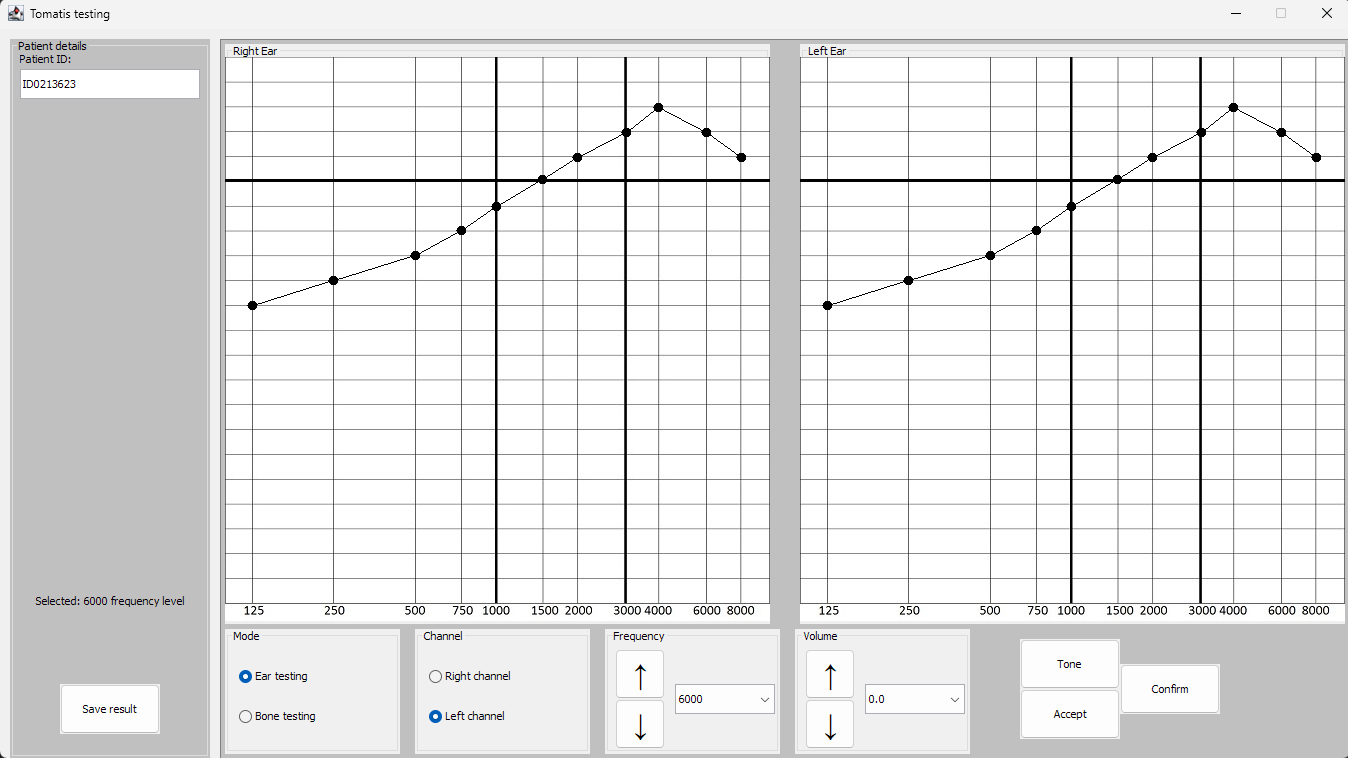
The project's purpose was deeply fascinating — it was a tool designed around the Tomatis Method, a therapeutic approach that uses sound stimulation to improve auditory processing. The application needed to function as a digital audiometer: play calibrated pure-tone sine waves at precise frequencies, route audio through bone conductors and headphones to specific ears, and plot a patient's hearing thresholds on a standard audiogram chart.
Looking back at this code ten years later is like opening a time capsule. Time capsule where someone put both gold and totally not preserved sandwich. Every line tells a story — of a developer learning on the fly, of creative problem-solving born from inexperience, and of the raw ambition to tackle something genuinely complex for the beginner.
Well… by then I had an opinion that if it is doable on the computer, then I can do it.
That quite checks out for me up to this day, over 10 years later.
What the Application Actually Did
At its core, TomatisTesting was a hearing assessment workstation. Here's what it was capable of:
| Feature | Description |
| Audiogram Rendering | Two side-by-side audiogram grids (left ear / right ear) with frequency on the X-axis and volume on the Y-axis |
| Pure Tone Playback | 11 pre-generated sine wave WAV files covering the standard audiometric range: 125, 250, 500, 750, 1000, 1500, 2000, 3000, 4000, 6000, and 8000 Hz |
| Stereo Channel Routing | Audio could be routed exclusively to the left or right channel using FloatControl.Type.PAN |
| Volume Control | 21 discrete volume levels from -5 dB to +15 dB, applied via MASTER_GAIN control |
| Testing Modes | Support for both air conduction (ear testing) and bone conduction testing with different frequency ranges |
| Result Plotting | Real-time plotting of hearing thresholds directly on the audiogram with connected dots |
| Patient Management | Anonymous Patient ID input field and a "Save result" button for record keeping |
The audiogram grid itself was a carefully crafted JPG image with frequency markers along the bottom — the classic clinical audiogram layout that any audiologist would immediately recognize. The second functionality of this application was to send all of the collected data to a specifically tailored LaTeX file and pass it through the LaTeX compiler, to produce the very good looking document with the chart of the patient examination result:
The Architecture: A 520-Line Masterclass in "Getting It Done"
The entire application consisted of just 12 Java files spread across two packages:
com.company/
├── Main.java           — Creates the Frame. That's it.
├── Frame.java          — Swing application consuming all the rest.
├── LeftPanel.java      — Left ear audiogram panel.
├── RightPanel.java     — Right ear audiogram panel.
├── Audio.java          — Raw sine wave generator (marked "Obsolete").
├── Beep.java           — WAV playback with stereo panning.
├── MakeSound.java      — Another audio approach (unused).
├── Checkbox.java       — Data holder for frequency arrays.
├── Radiobtn.java       — Custom radio button wrapper.
└── components/
    ├── Btn.java— Custom button component.
    ├── BtnArrow.java— Arrow button with Unicode arrows (↑↓).
    └── ExtPanel.java   — Custom titled panel wrapper.
Everything — and I mean everything — lived inside. No lollygagging code. Everything mattered.
Frame.java. The UI construction, the event handling, the audio playback logic, the coordinate calculations for plotting points on the audiogram. It was the monolith to end all monoliths, and there's something beautifully honest about that. This was one of those applications for which UI beauty was a heresy, and UX was a targeted brute.
The Charming Challenges (and the Code That Reveals Them)
🎵 The Audio Problem: Three Attempts to Make Sound
Perhaps the most telling sign of a developer learning in real-time is that the project contains three separate approaches, visible through commits changes, to play some actual audio:
- Audio.java — A raw sine wave generator that synthesized sound mathematically using Math.sin(). It's marked as "Obsolete" in the comments. This was the first attempt: generate the sound from pure math. Noble, but controlling volume and channel routing at this level was clearly a nightmare.
- MakeSound.java — A SourceDataLine-based approach that streamed WAV files byte by byte. More control, but commented out in
- Frame.java — even contained the note "uncomment for playing stored wavs (in hard way)". The "hard way" — we've all been there.
- Beep.java — The final, working solution. Pre-recorded WAV files played through Clip with FloatControl.Type.PAN for stereo routing and MASTER_GAIN for volume. Simple, reliable, and shipped. The date in the header: August 3rd, 2016 — nearly a month after the project started on July 7th.
That evolution from synthesized sine waves → raw byte streaming → pre-recorded clips with built-in controls tells the story of a developer hitting walls, pivoting, and finding pragmatic solutions under deadline pressure instead of playing digital god and steering absolutely every aspect of the application functioning.
📐 The Pixel Coordinate Map: Manual Precision
One of the most fascinating pieces of code is the
getcurrentX()
getcurrentY()
methods — two massive switch statements that manually map each frequency index and volume index to an exact pixel coordinate on the audiogram image:
java
private int getcurrentX() {
    switch (frequency_index) {
        case 0:x = 22;  break;   // 125 Hz
        case 1:x = 103; break;   // 250 Hz
        case 2:x = 185; break;   // 500 Hz
        case 3:x = 231; break;   // 750 Hz
        case 4:x = 266; break;   // 1000 Hz
        case 5:x = 312; break;   // 1500 Hz
        // ... and so on for all 11 frequencies
    }
    return x;
}
Every single pixel value was hand-measured against the audiogram JPG. No dynamic scaling. No layout math. Just an image, and probably a lot of trial-and-error pixel counting. I really don’t remember though, it seems the easy way when I look at it.
It's the kind of approach that works perfectly — until someone resizes the window (which is why setResizable(false) was set, naturally – after all it was not a browser app, and was aimed to be run on laptops, for which it worked absolutely fine).
🔧 The Hardcoded Paths
An absolute paths. On this specific computer. In this specific user's home directory. As a first-project habit, it's completely understandable — relative paths, classpath resources, and JAR packaging are concepts that come with experience. This hardcoded path is a beautiful artifact of a simpler times, when the code was made only on single machine, no forks, no branches, no bosses, no managers. This kind of freedom would be a nice refreshment after spending years of corporate processes now… But to be honest, once you are too familiar with the pipelines and workflows, some kind of OCD is kicking in with the will to improve that code, refactor it, write tests and so…
Of course ignoring the temptation to write this from the scratch in the first place.
Roughly one month from start to finish. The progression of the commits seem to check out with the logical sequence of progression: data modeling first, then the UI skeleton, then weeks wrestling with Java's audio subsystem, and finally a component refactoring to clean things up.
What It Tells Us About Growth
Looking at this project through the lens of a decade of experience, every "mistake" was actually a lesson being learned in real-time:
- The monolithic structure
Frame.java taught the importance of separation of concerns — the later emergence of the components/ package shows this lesson being absorbed during the project.
- Three audio implementations taught that the first approach isn't always the right one, and that sometimes pre-processed assets beat real-time generation.
- Manual pixel mapping taught about the relationship between visual layout and data representation.
And yet, despite all of these "beginner" patterns, this project worked. No bugs, no glitches. It played calibrated tones. It routed audio to specific ears. It plotted audiogram results on a clinical grid, and as a cherry on the top it generated professional grade(quite ugly though) document. It had a clean, organized UI with mode selection, channel routing, frequency and volume controls, and patient identification. For a first paid project, I would say that's genuinely impressive. However this seem to be characteristic for when a freshly discovered passion is being pursuit.
Latex file output:

The Bigger Picture
This project sits at a fascinating intersection — a young developer working on something with real medical significance. The Tomatis Method is used in auditory processing therapy, and this tool was designed to help practitioners assess patients' hearing profiles. The frequency ranges (125–8000 Hz for air conduction, 250–4000 Hz for bone conduction), the volume scale (-5 to +15 dB), the dual audiogram layout — these aren't arbitrary choices. They mirror the clinical standards used in professional audiology.
Someone trusted a developer with their first paid project, and that developer delivered a working medical assessment tool. Built in IntelliJ IDEA 2016, targeting JDK 1.8, using Swing in an era when desktop Java was already becoming niche. And it shipped.
Final Thought
Every expert was once a beginner. But not every beginner gets to look back at their first steps and see a complete, functional application staring back at them. My little adventure with Tomatis Method Testing application is proof that ambition — paired with enough stubbornness to try different approaches to make it work — can produce something genuinely useful, even when the hardcoded paths only work on one computer in the world and the whole codebase is visibly written by a student.