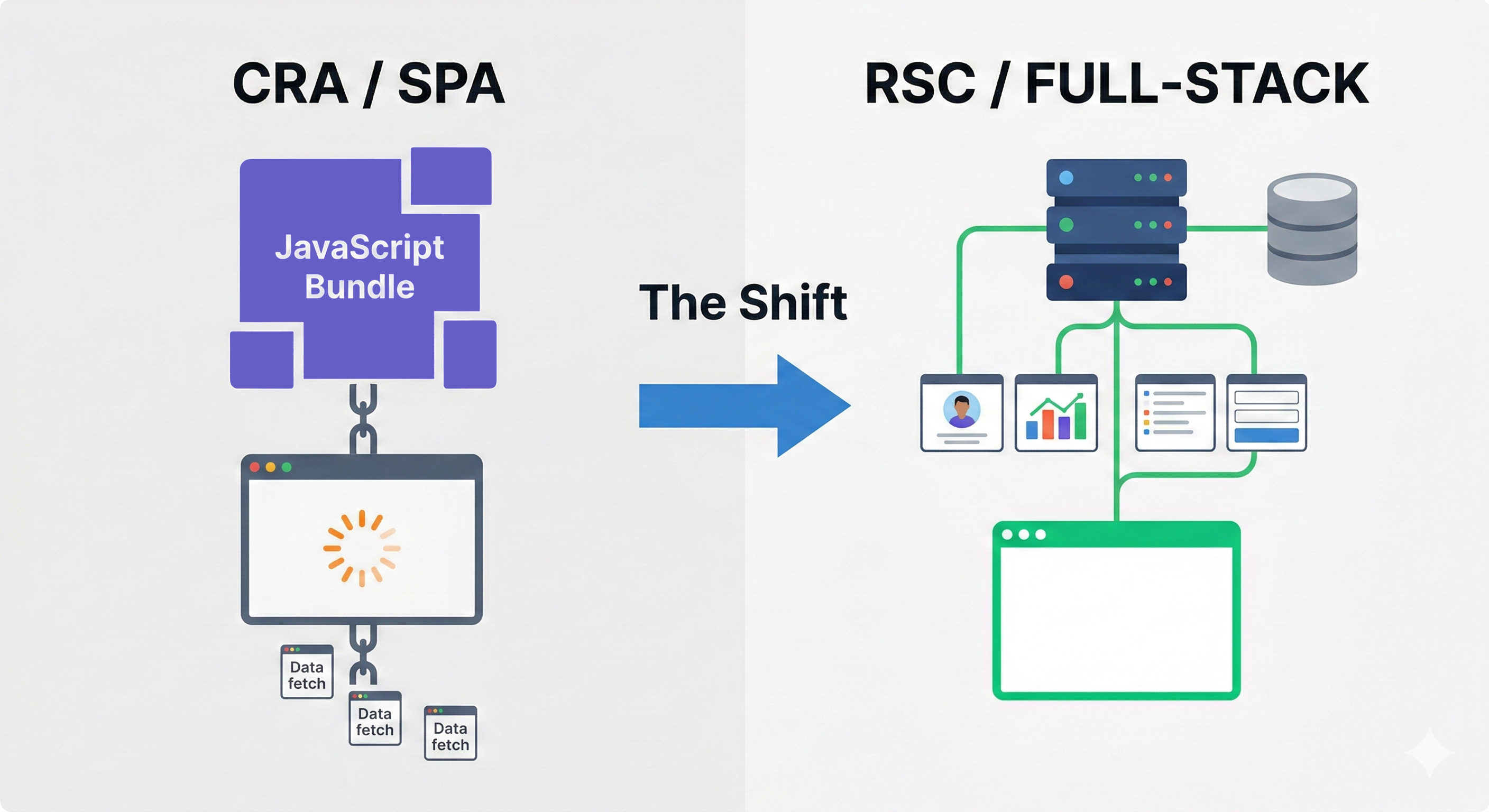
React Architecture Shift - dusk of CRA, rising sun of RSC
The Architecture Shift: The Death of CRA and the Full-Stack Merger
The king is... well, not dead yet,
but the prince is already getting cozy on the throne.
By 2026, the separation between "Frontend" and "Backend" in the React ecosystem has all but evaporated. The era of the "Single Page Application" (SPA) as we knew it—a blank white HTML page that fetches a massive JavaScript bundle to render a spinner, which then fetches data—is over.
This shift was driven by the official deprecation of Create React App (CRA) (effectively in 2023, buried by 2025) and the universal adoption of Meta-Frameworks (Next.js, React Router v7) that leverage React Server Components (RSC).
The Eulogy for Create React App (CRA)
For nearly a decade, CRA was the default entry point for React. It was simple, but it enforced a fatal architectural flaw: the Network Waterfall.
The initial HTML response is effectively empty: <div id="root"></div>. The browser is forced into a serial chain of blocking operations. It cannot render a single pixel of content until it has downloaded the JavaScript bundle, parsed it, executed it, and triggered the initial data fetch.
In a CRA app, the browser had to:
- Download
bundle.js(Wait...) - Parse & Execute JavaScript (Wait...)
- Render the
<App />shell (Wait...) - Trigger
useEffectto fetch data (Wait...) - Finally render content.
To understand the severity, we must look at Core Web Vitals on a mid-range device (e.g., a 3-year-old Android phone on 4G). The "Cost of JavaScript" is not just download time; it is parsing time.
| Metric | Legacy SPA (CRA) | Modern SSR (Next.js / Router v7) | Difference |
| First Contentful Paint (FCP) | 1.8s (Spinner) | 0.4s (Actual Content) | 4.5x Faster |
| Largest Contentful Paint (LCP) | 2.5s | 0.8s | 3.1x Faster |
| Time to Interactive (TTI) | 3.2s | 1.2s | 2.6x Faster |
| Bundle Size (Hello World) | ~180 KB (React + DOM) | ~0 KB (HTML only) | Infinite Improvement |
| SEO Indexability | Low (Requires JS execution) | Perfect (Raw HTML) | Critical |
By 2026, this pattern is considered an anti-pattern. Search engines penalized it (poor Core Web Vitals), and mobile users on shaky 5G connections abandoned it.
The community realized that React is no longer just a Frontend library; it is an architecture by itself.
The Code Anatomy of the Problem The issue isn't just the network; it's the Dependency Chain.
- Old way (CRA): The data requirements are hidden inside the component. The browser doesn't know it needs to fetch
/api/useruntil after it has downloaded and executedUserPage.js. - New trend (Frameworks): The data requirements are hoisted to the server. The HTML stream includes the data as it arrives. The browser receives the markup for "User Name" before it has even finished downloading the CSS.
The New Standard: React Server Components (RSC)
Mechanism: The "RSC Payload"
React Server Components (RSC) are not just a different way to write components; they use a completely different wire format. When a server component renders, it doesn't output HTML strings directly; it streams a special JSON-like format called the RSC Payload.
This payload describes the component tree. Crucially, it leaves "holes" (placeholders) for Client Components. This allows the server to compute the heavy parts (Markdown processing, Date formatting) and send only the result to the browser, while keeping the interactive parts (Buttons, Inputs) alive.
The "Zero-Bundle" Advantage The most significant shift is the ability to use massive libraries on the server without impacting the client.
Scenario: A Dashboard exporting data to Excel.
- Legacy: You import
exceljs(260KB). The user downloads 260KB just to view a button they might not click. - RSC: You import
exceljsin a Server Action or Component. The user downloads 0KB of Excel logic.
Comparison: The "Old" vs. The "New"
Let's look at a simple user profile page to see how drastically the mental model has changed.
The Legacy Way (Client-Side Waterfall - 2022)
The browser does all the heavy lifting.
Types must be duplicated manually.
// ❌ DEPRECATED (Client-Side Rendering)
import React, { useEffect, useState } from 'react';
import { Spinner } from './Spinner';

// We had to manually define types for API responses
interface UserProfile {
  id: string;
  name: string;
  bio: string;
}

export const UserProfilePage: React.FC<{ userId: string }> = ({ userId }) => {
  const [user, setUser] = useState<UserProfile | null>(null);
  const [loading, setLoading] = useState(true);

  useEffect(() => {
    // The "Waterfall": Component mounts -> waits -> fetches
    fetch(`/api/users/${userId}`)
      .then((res) => res.json())
      .then((data) => {
        setUser(data);
        setLoading(false);
      });
  }, [userId]);

  if (loading) return <Spinner />;
  if (!user) return <div>User not found</div>;

  return (
    <div className="profile">
      <h1>{user.name}</h1>
      <p>{user.bio}</p>
    </div>
  );
};
The Modern Standard (Server Components - 2026)
- The server does the work.
- The component is
async. - Database access is direct.
// ✅ MODERN (React Server Component)
// This file runs ONLY on the server. No bundle sent to client.
import { db } from '@/lib/db';
import { notFound } from 'next/navigation'; // or 'react-router'

interface PageProps {
  params: Promise<{ userId: string }>;
}

export default async function UserProfilePage({ params }: PageProps) {
  // 1. We await the params (standard in Next.js 15+ / Router v7)
  const { userId } = await params;

  // 2. Direct Database Access
  // No API route needed. No fetch(). No useEffect().
  const user = await db.user.findUnique({
    where: { id: userId },
    select: { name: true, bio: true } // Optimization: Select only what is needed
  });

  if (!user) return notFound();

  // 3. Render HTML directly
  return (
    <div className="profile">
      <h1>{user.name}</h1>
      <p>{user.bio}</p>
    </div>
  );
}
Insight: We deleted useState, useEffect, the loading state, and the API fetch layer. The data is simply there when the page streams in.
Implementation: The "Hybrid" Pattern The hardest part of 2026 architecture is knowing when to cross the "Server-Client Boundary." Let's use the "use client" directive to mark the transition point.
// app/dashboard/page.tsx (Server Component)
// 1. This runs entirely on the backend.
import { db } from '@/lib/db';
import { LargeChartLibrary } from '@/lib/heavy-charts'; // Not sent to client
import { ExportButton } from './ExportButton'; // Client Component

export default async function DashboardPage() {
  // 2. Direct DB Access (No API layer)
  const revenue = await db.revenue.findMany({ take: 10000 });

  return (
    <div className="p-6">
      <h1>Dashboard</h1>

      {/* 3. Rendered to static HTML/SVG on server.
          The chart library is NOT in the client bundle. */}
      <LargeChartLibrary data={revenue} />

      {/* 4. We pass data to the "Client Island" */}
      <ExportButton data={revenue} />
    </div>
  );
}
// app/dashboard/ExportButton.tsx (Client Component)
'use client'; // <--- The Boundary

import { useState } from 'react';
// We import ONLY what is needed for interaction

export function ExportButton({ data }: { data: any[] }) {
  const [isExporting, setExporting] = useState(false);

  return (
    <button
      onClick={() => {
        setExporting(true);
        // Trigger client-side interaction
        alert(`Exporting ${data.length} rows...`);
      }}
      className="bg-blue-500 text-white px-4 py-2 rounded"
    >
      {isExporting ? 'Exporting...' : 'Download CSV'}
    </button>
  );
}
The "Blur": Server Actions replace API Routes
The End of fetch() In the traditional MERN stack (MongoDB, Express, React, Node), you spent 30% of your time writing "glue code": API routes that just received JSON, validated it, and passed it to a controller.
In 2026, Server Actions remove this layer. A Server Action is a function that executes on the server but can be invoked from the client as if it were a local function. The framework automatically handles:
- Serialization: Converting arguments to a POST request.
- Security: CSRF protection and Origin checks.
- Progressive Enhancement: If JS is disabled, the form still works via standard HTML submission.
Deep Dive: Type-Safe Mutation with Zod We no longer guess what the API returns. The function signature is the API contract.
1. The Server Action (Backend Logic)
// actions/create-post.ts
'use server';

import { z } from 'zod';
import { db } from '@/lib/db';
import { revalidatePath } from 'next/cache';
import { redirect } from 'next/navigation';

// Define the schema once. Used for both validation and type inference.
const CreatePostSchema = z.object({
  title: z.string().min(3, "Title must be at least 3 chars"),
  content: z.string().min(10, "Content too short"),
  userId: z.string().uuid(),
});

export type ActionState = {
  errors?: {
    title?: string[];
    content?: string[];
  };
  message?: string;
};

export async function createPost(
  prevState: ActionState,
  formData: FormData
): Promise<ActionState> {
  // 1. Validate the FormData directly
  const validatedFields = CreatePostSchema.safeParse({
    title: formData.get('title'),
    content: formData.get('content'),
    userId: formData.get('userId'), // usually from session, hidden for demo
  });

  if (!validatedFields.success) {
    return {
      errors: validatedFields.error.flatten().fieldErrors,
      message: "Missing Fields. Failed to Create Post.",
    };
  }

  // 2. Database Mutation
  try {
    await db.post.create({
      data: {
        title: validatedFields.data.title,
        content: validatedFields.data.content,
        authorId: validatedFields.data.userId,
      },
    });
  } catch (error) {
    return { message: "Database Error: Failed to create post." };
  }

  // 3. Cache Invalidation & Redirect
  revalidatePath('/dashboard/posts');
  redirect('/dashboard/posts');
}
2. The Client Form (React 19 Hooks)
Note the use of useActionState (formerly useFormState), which manages the lifecycle of the server request automatically.
// components/CreatePostForm.tsx
'use client';

import { useActionState } from 'react';
import { createPost } from '@/actions/create-post';

export function CreatePostForm() {
  const initialState = { message: "", errors: {} };
  // React 19: useActionState binds the action and manages loading/error state
  const [state, dispatch, isPending] = useActionState(createPost, initialState);

  return (
    <form action={dispatch} className="space-y-4">
      <div>
        <label htmlFor="title">Title</label>
        <input
          id="title"
          name="title"
          placeholder="Enter title"
          aria-describedby="title-error"
          className="border p-2 w-full"
        />
        {/* Type-safe error rendering from the Server Action return type */}
        <div id="title-error" aria-live="polite" className="text-red-500 text-sm">
          {state.errors?.title?.map((error: string) => (
            <p key={error}>{error}</p>
          ))}
        </div>
      </div>

      <div>
        <label htmlFor="content">Content</label>
        <textarea id="content" name="content" className="border p-2 w-full" />
      </div>

      <button
        type="submit"
        disabled={isPending}
        className="bg-blue-600 text-white px-4 py-2 rounded disabled:opacity-50"
      >
        {isPending ? 'Saving...' : 'Create Post'}
      </button>

      {state.message && (
        <p className="text-red-500 font-bold">{state.message}</p>
      )}
    </form>
  );
}
The Framework Landscape: Next.js vs. React Router v7
With the official deprecation of CRA, the ecosystem has matured into two distinct philosophies. It is no longer about "which is faster" (they are both fast); it is about Control vs. Convenience.
Next.js (The "App Router" Architecture) Next.js is the "Apple" of React frameworks. It is opinionated, integrated, and designed for the Vercel cloud infrastructure (though deployable elsewhere).
- Routing: Strictly file-system based. If you put a file in
app/dashboard/page.tsx, it is a route. - Data Fetching: Automatic. You
awaitdata in the component. The framework decides how to cache it based on aggressive heuristics. - Middleware: Runs on the Edge Runtime (V8 isolates are a key advantage here), allowing for ultra-fast authentication checks before the main server is even hit.
React Router v7 (The "Web Standards" Architecture)
Formerly Remix, React Router v7 is the "Linux" of React frameworks. It exposes the underlying HTTP machinery to the developer.
- Routing: Flexible. You can use file-system routing or a
routes.tsconfig file, which is preferred for large-scale apps with complex layouts (e.g., nested dashboards with independent data loaders). - Data Fetching: Explicit. You define a
loaderfunction that runs in parallel with other loaders. This avoids the "request waterfall" inside components. - Caching: Uses standard HTTP
Cache-Controlheaders. If you know how the web works, you know how React Router works.
Comparison Matrix: The 2026 Decision Guide
| Feature | Next.js 15+ | React Router v7 |
| Routing Model | File-System (Strict) | Config or File-System (Flexible) |
| Data Loading | Async Components (await fetch) | Parallel Loaders (loader function) |
| Mutation | Server Actions (Inline) | Actions (action function) |
| Caching Philosophy | "Cache Everything by Default" | "Use HTTP Headers" |
| Deployment | Best on Vercel / Node.js | Any Platform (Cloudflare, Node, Deno) |
| Learning Curve | High (Many proprietary APIs) | Moderate (Relies on Web APIs) |
Conclusion: The Full-Stack Merger
The barrier between "Frontend" and "Backend" has collapsed. Which is kinda sad for those who were really trying their best to stay out of the "backend dark matter," BUT the integration is so seamless that a fluent React developer won't even feel that much of a bother, and will consume new possibilities just as they most likely had to interact with the backend layer anyway.
A "React Developer" in 2026 is effectively a Full-Stack Engineer who specializes in the UI. We write SQL queries in our components and manage cache headers in our routes. The mental model has shifted from "fetching data from an API" to "accessing data directly," with the framework managing the network boundary invisibly.
This alone, and the fact of how advanced the help from agentic AI is getting, should flatten the learning curve enough to enable many unconvinced devs out here. Juniors, however, and graduates...
I wouldn't want to be one starting this adventure from scratch. Not in these market circumstances.